
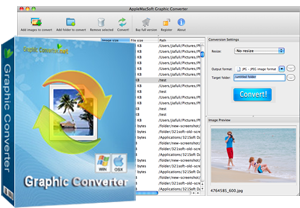
Graphic Converter for Mac
Quickly and easily convert multiple graphic files on Mac OS X at the click of a button. Support import over 70 different graphic-based formats, and export it out of 50 + available image formats. More than that, you can also resize (reduce or enlarge) any single or batches of photos, and reduce their file size to make them more suitable for website use, emailing to friends, or displaying on your mobile phone.
Convert images between all key formats such as PNG, JPG, GIF, BMP, CUR, ICO, TIFF, PCX, SVG, RAS, PSD, Photo RAW formats and more.
It's so cheap that you need only pay one-time registration fee $19.95. This software works on both Mac and Windows. No matter you need a copy for yourself using, or you need to order a copy for your company, it's the right choice.


Convert more than 30 image formats from one to another !
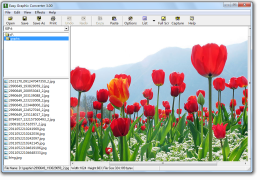
Are you a website designer? Are you tired of studying too complex image processing software? Now,
you may choose Easy Graphic Converter, a very small image processing software for Windows with powerful functions.
Easy Graphic Converter is an all-in-one batch image converter and resizer. It supports more than
50 different filters. It supports reading graphics of
BMP, DIB, JPG, JPEG, GIF, ICO, ICB, PCX, PCD, PSP, PBM, PGM, PSD, PPM, PSG, PNG, VST, VDA, EMF, WMF,
TIF, TIFF, WBMP, RLE, SGI, and more. and supports saving graphics to BMP, GIF, JPG, JPEG, ICO, DIB,
TIF, TIFF, WBMP, WMF, EMF, PNG, TGA, and more. It supports screen capturing with different ways.
It supports unlimited UNDO and REDO operations.
Easy Graphic Converter Key Features:
- Support more than 50 filters like noise, contrast, soften, mosaic, gray scale, blur, sharpen, stretch, lightness, and more.
- Open and view more than 30 images formats including JPG, GIF, BMP, TIF, TIFF, DIB, ICO, ICB, PCX, PCD, PSP, PBM, PGM, PSD, PPM, PSG, PNG, VST, VDA, EMF, WMF, WBMP, RLE, SGI, TGA, and more.
- Save and write more than 10 mages formats including DIB, BMP, GIF, JPG, ICO, TIF, TIFF, WBMP, WMF, EMF, TGA, PNG, and more.
- Support editing image with selection, rotate, resize, add canvas, and more.
- Support capturing screenshots from many ways.
- Full options of capturing, images formats, and other
- Stretch image to ICON size and save as ICON file.
- It is simple to use because of its intuitive interface that gives you control over what you are doing
User Comments

I have looked far and wide to find a converter that will convert and resize my 800+ images to JPG in a batch process. It took me many months of looking for, but your software really does make the image conversion easy.
– John Doe, Some Corporation

I really like this software. I've been using it to convert numerous images for websites that I build. it’s perfectly working. very happy happy of the product. I bought it.
– Julia

Just a quick note of thanks! I use your Mac Graphic Converter all the time for just normal office stuff. It has worked well for me and filled in some of the OSX gaps..
– John Castillo, B "<" H Foto "<" Electronics Corp